

Registering a warranty for a closeout appliance usually doesn’t extend its standard coverage. For most U.S. appliances, the purchase date on the receipt starts the warranty period. Registration can help document ownership and connect you with manufacturer support.
It’s reasonable to wonder whether a closeout purchase changes the usual warranty rules. The key is to separate registration from the coverage terms: a closeout label doesn’t, by itself, explain what the manufacturer’s warranty includes or excludes. Some manufacturers offer a registration bonus, such as extra coverage, when you register within 30 to 90 days of purchase.
This guide explains whether registration is required, what proof to keep, and how closeout exclusions may affect coverage. You’ll learn what to look for in the warranty terms to determine whether registration adds coverage or simply records your appliance details.
Key Takeaways
- For most U.S. appliances, the receipt’s purchase date starts standard warranty coverage; registration usually doesn’t extend it.
- Read the warranty terms to see whether registration is required for a limited warranty or offered as a bonus.
- Keep your sales receipt and any registration confirmation together to help document the purchase if you need warranty service.
- Look for closeout or liquidation exclusions in the written warranty terms, since the sale category alone doesn’t explain what coverage applies.
- Compare any registration offer’s deadline and added coverage with the appliance’s existing warranty before relying on it.
Does registration extend your warranty?
For most U.S. appliances, standard warranty coverage starts on the purchase date shown on your receipt, not when you register. Registering a warranty for a closeout appliance can help the manufacturer identify the product and provide support, but usually won’t extend the standard term.
To register, use the manufacturer’s official product-registration portal or the instructions supplied with the appliance. Enter the model and serial numbers exactly as printed on the appliance label, then save the confirmation. The label is often inside the door, on the back, or underneath the unit.
Manufacturer registration channels
Manufacturer registration forms and portals record an appliance’s details with its maker. A completed form can link the model and serial number to your ownership record. Registration may also let the manufacturer send product updates, recall notices, troubleshooting tips, or guides, and help you reach its support team.
Registration alone generally doesn’t add time to standard coverage. Some manufacturers offer a registration bonus, such as an extra month or an extended warranty term, when you register within a window usually lasting 30 to 90 days from purchase. Read the written offer for its deadline and conditions. Separate the bonus from the appliance’s original coverage period.
Our appliances are not used or refurbished. To confirm an appliance’s condition, check the seller’s written description, your receipt, and purchase documents. Registration alone doesn’t establish the appliance’s condition or ownership history.
A warranty may transfer when a closeout appliance is resold, but transferability depends on the manufacturer’s written warranty terms. Before relying on continued coverage, look for terms about a second owner, proof of sale, or transfer restrictions.
Registration rejection and coverage
A registration rejection means the manufacturer’s portal hasn’t accepted the appliance details. It doesn’t, by itself, determine whether a warranty claim qualifies. Compare the model and serial numbers you entered with the appliance label, and check the purchase date against your receipt. Keep any rejection message and confirmation for your records.
If the manufacturer rejects your registration or coverage, contact its support team with the model and serial numbers, receipt, and rejection details. Ask which warranty term or document applies, and save the response with your purchase records. When registering a warranty for a closeout appliance, these records help support staff identify the product and explain the next step. Describe any appliance problem clearly and include its identifying details when seeking troubleshooting help.
Whether registration is required for standard warranty coverage
For most U.S. home appliances, registration isn’t required to start standard warranty coverage. Warranty terms can vary, so check the documentation for any registration requirements or benefits.
Registration requirements for standard coverage
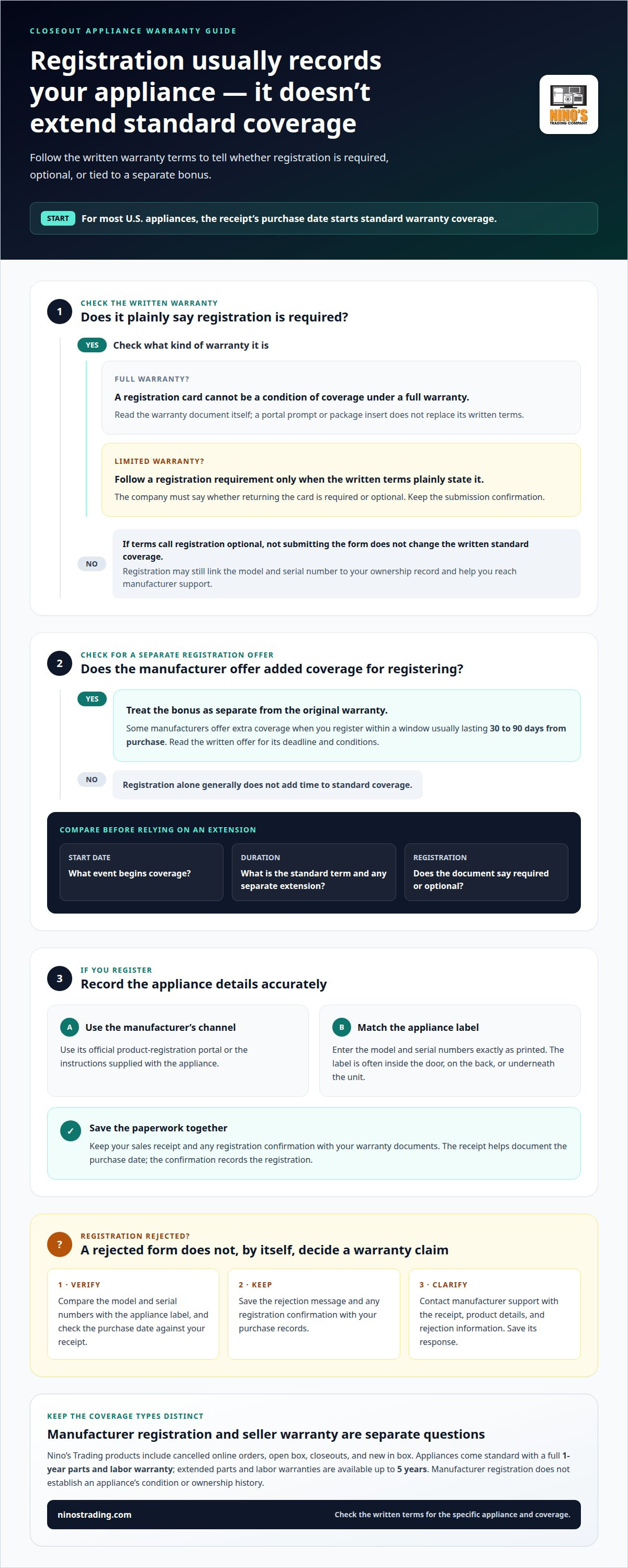
Check the written warranty terms to understand what registration, if any, is needed for coverage. For most U.S. appliances, standard coverage starts on the purchase date, not at registration. A limited warranty can require registration only when its written terms plainly say so. A registration reminder doesn’t automatically mean your basic warranty depends on submitting the form.
For a product with a full warranty, the Magnuson-Moss Warranty Act doesn’t allow a registration card to be a condition of coverage. A company offering a limited warranty must tell consumers whether returning the card is required or optional. Read the warranty document, not just a portal prompt or package insert. A portal may encourage registration, but the written terms define the requirement.
Warranty terms and activation
Warranty terms are the written conditions that explain coverage, its duration, and any registration requirement. “Register your appliance” can mean recording product details, activating a separate offer, or meeting a stated condition of a limited warranty. Look for the coverage start date and term, as well as any wording that explains whether registration changes either one.
For most home appliances, registration doesn’t activate standard warranty coverage; the purchase date on the receipt starts the period. Registration may still help the manufacturer associate the appliance with its owner. If the manufacturer offers an extended term for registering, treat it separately from standard coverage. The offer’s deadline and conditions determine whether the added term applies.
Use the warranty document to distinguish these points:
- Start date: Identify the event the terms use to begin coverage, such as the purchase date.
- Duration: Find the stated length of standard coverage and any separate extension.
- Registration: Note whether the document calls submission required or optional.
If the terms say registration is optional, not submitting the form doesn’t change the written standard coverage. If a limited warranty plainly requires registration, follow the stated process and keep the submission confirmation. If a portal message seems to conflict with the warranty document, save both records and ask the manufacturer’s support team to explain the specific term.
Closeout status alone doesn’t establish whether registration is necessary. The written warranty terms govern the specific appliance’s coverage conditions. Compare those terms with the product’s condition description and purchase record before relying on an extension. For readers weighing appliance purchase options, review the available appliance options alongside the warranty terms.
Purchase receipts and warranty documentation
A sales receipt is generally useful proof for a U.S. appliance warranty claim. Keep it with your registration records so the purchase date, appliance details, and ownership documents are easy to find.
Receipts as proof of purchase
A purchase receipt records the transaction and can generally serve as proof when filing a product warranty claim in the United States. It helps establish when you bought the appliance, which can support a claim tied to its purchase date.
Keep the original receipt, whether printed or electronic. A paper receipt can fade, while an email receipt can be hard to find later. Save an electronic copy in a folder labeled with the appliance type, such as “washer receipt,” and retain the original email or store document. If the receipt identifies the model, keep that detail visible.
Before filing a claim, gather the receipt and the appliance’s model and serial numbers. These identifiers distinguish one product from another, while the receipt provides proof of purchase. For example, if a refrigerator needs warranty service, its receipt and identifying numbers give the manufacturer’s support team useful details in one place.
Registration and purchase records
Registration and purchase records link an appliance’s details with its buyer and transaction. Keep them together because registration confirmation may help show the purchase date or ownership when you seek warranty service.
Save the manufacturer’s registration confirmation with the receipt and warranty document. If you registered through a portal, keep the confirmation email or take a screenshot of the completed submission. Confirmation doesn’t replace proof of purchase, but it gives you another record of the product details submitted to the manufacturer.
Choose a consistent system for storing records for each appliance. A digital folder can hold the receipt, warranty terms, registration confirmation, and support messages. A paper envelope stored with household documents works too. Name files by appliance and purchase date, so “range receipt” is easier to find than a generic download.
Ownership can become less straightforward after a move, gift, or resale. Keep any sale or transfer paperwork with the original receipt and manufacturer correspondence. Registration may help document ownership, but the warranty terms determine whether coverage transfers to another owner. These records can also help support an insurance claim involving the appliance.
- Purchase record: Keep the receipt showing the transaction and purchase date.
- Product record: Store the model and serial numbers with the warranty document.
- Registration record: Retain the manufacturer’s confirmation and related messages.
When requesting warranty service, provide clear copies and keep the originals. A complete set of records links the appliance, its purchase, and its registration without relying on memory or a missing confirmation email.
Limited and full warranty registration requirements
Whether registration is a condition of coverage depends on the warranty terms. In the United States, full and limited warranties have different registration rules, so read the document supplied with the appliance rather than relying on a general reminder.
Under the Magnuson-Moss Warranty Act, a company can’t require a registration card as a condition of a full warranty. Registration may still help with product records, updates, or a separate offer, but it isn’t a prerequisite for full-warranty coverage. A form included in the packaging doesn’t change that rule.
Limited warranties work differently. Check the written warranty to see whether it explains if registration is required. Companies offering a limited warranty must tell consumers whether returning a registration card is required or optional. Look for direct wording in the warranty document, such as a statement that registration is required, rather than assuming a portal prompt sets a condition.
Read the complete document before deciding what to submit. Identify whether the warranty is full or limited, then find the registration language and any stated submission method. If the document says registration is optional, the form isn’t a condition under those terms. If a limited warranty expressly requires it, follow the stated process and keep the confirmation with your purchase records.
Registration bonuses are separate from the standard warranty. Some manufacturers offer an extra month or an extended warranty term when customers register within a window usually lasting 30 to 90 days from purchase. The offer’s written terms should explain the deadline and what additional coverage applies. A registration receipt alone doesn’t show that a bonus was granted.
Read an “extra-year” limited warranty offer as a specific promotion, not as something implied by the word “register.” Check whether the offer adds a year, changes the coverage period, or applies only under stated conditions. Compare its start date with the original warranty to see whether the extra term follows standard coverage or overlaps it.
- Full warranty: Registration can’t be required as a condition of coverage.
- Limited warranty: Registration is required only when the written terms plainly say so.
- Bonus offer: Keep the promotion terms and submission confirmation together.
If a package insert, manufacturer portal, and warranty document seem inconsistent, save each item and ask the manufacturer to explain the specific wording. The warranty classification, written requirement, and bonus terms determine how registration relates to coverage.
Closeout and liquidation retailer exclusions
Yes, you can register a closeout appliance through its manufacturer’s registration process if the model can be entered. Registering a warranty for a closeout appliance records product details, but doesn’t remove an exclusion stated in the written terms.
A closeout or liquidation label alone doesn’t establish whether manufacturer coverage applies. The deciding details are the written warranty, the appliance’s condition, and any specific exclusions or purchase requirements. Distinguish the sale category from the coverage rules.
Look for wording about clearance merchandise, open-box products, or purchases from particular sellers. These are examples of terms to look for, not universal exclusions. Our open-box and closeout appliances are not used or refurbished. If the warranty excludes a category that describes the appliance, registration won’t change that condition. If it doesn’t, the word “closeout” alone doesn’t determine the coverage outcome.
Condition matters too. “Closeout” can describe a sale status, while “open box” describes a product condition. Our open-box and closeout appliances are not used or refurbished. Compare the sales description and purchase paperwork with the warranty’s definitions.
Separate manufacturer coverage from a store warranty or extended protection plan. A store plan covers a closeout appliance only when its written terms include that product and don’t exclude its condition or sale category. The plan document should identify the covered appliance, term, exclusions, and service-request process. A plan’s name or sales description isn’t a substitute for its terms.
- Product status: Match the appliance’s stated condition to the warranty’s definitions.
- Purchase eligibility: Look for seller or sale-category restrictions in the written terms.
- Coverage type: Keep manufacturer warranty terms separate from any store protection plan.
- Claim process: Identify the required proof and the party responsible for handling a claim.
For example, if a refrigerator is sold as open box, check whether the warranty specifically addresses open-box items. If the written terms exclude that condition, successful registration doesn’t override the exclusion. If the terms provide coverage, keep them with the receipt and registration confirmation.
When registering a warranty for a closeout appliance, judge coverage by the written terms, not the closeout label alone. A store warranty or extended protection plan may cover the appliance if its contract includes that product and condition; the contract defines the scope.
Nino's Trading Company: Closeout Appliances
Nino's Trading Company offers closeout appliances and cancelled online appliance orders, as well as refrigerators, washers, and dryers. If you’re comparing options, you can consider the appliance and its condition alongside the warranty questions covered in this guide.
All appliances come with a full 1 year parts and labor warranty, with extended parts and labor warranties available up to 5 years. Review the warranty terms for the specific appliance so you understand the coverage and how it relates to manufacturer coverage. Nino's Trading Company sells new, open-box, closeout, and cancelled-order appliances, not used or refurbished items.
If you’re considering an appliance, contact Nino's Trading Company to discuss your options.
Make your next appliance decision with clarity
Before choosing an appliance, consider how its condition and written warranty fit your household’s needs. Registering a warranty for a closeout appliance is one part of the decision; the purchase description and coverage terms matter too. Keep those details together so you can make an informed choice and find the records later.
Nino's Trading Company offers refrigerators, washers and dryers, and TVs. Use this guide to consider both the appliance category and the warranty paperwork that comes with your purchase. A clear decision now can make ownership easier to manage later.
For help exploring appliance options, contact Nino's Trading Company. Take the next step when you’re ready, with the questions that matter to your home in mind.
Frequently Asked Questions
Should you register that new product?
Yes, registration can help the manufacturer connect your appliance’s model and serial numbers with you. That record may help the company send recall or product-update notices and provide product-specific support. For example, registering a new refrigerator can help the manufacturer identify the correct model when you seek troubleshooting information. Registration doesn’t replace your receipt or change coverage terms, so keep the purchase record after submitting the form.
Why should you register your appliances if it's optional?
Optional registration can make it easier for a manufacturer to contact you about a recall or important product update. It can also help support staff identify your appliance when you ask about a problem. For instance, the model and serial numbers can distinguish similar-looking washer versions. Submit only the information the registration form requires; demographic or lifestyle details aren’t needed to register a product.
How do I register an appliance warranty with the manufacturer?
Use the manufacturer’s official registration portal or the method supplied with the appliance. Find the model and serial numbers on the appliance label, enter them as printed, and provide the purchase details requested by the form. Submit the information, then save the confirmation with your warranty papers. If the portal rejects an entry, compare the numbers against the label before contacting manufacturer support.
What information is needed to register an appliance warranty?
Have the appliance’s model number, serial number, and purchase date ready. The model and serial numbers are commonly printed on a label inside the door, on the back, or underneath the appliance. Keep your receipt nearby so you can enter the purchase date accurately. Registration forms may request personal information, but demographic or lifestyle details aren’t needed to register.
What is the deadline to register a new appliance warranty?
There isn’t one deadline that applies to every manufacturer or registration offer. Some manufacturers offer an extra month or extended term if you register within a window usually lasting 30 to 90 days from purchase. The promotion’s written terms set the applicable deadline and conditions. If you’re considering a bonus, use the purchase date on your receipt and retain proof that you submitted registration.
Does closeout or clearance status affect the manufacturer warranty?
Closeout or clearance status alone doesn’t determine the manufacturer warranty. The written warranty and any specific exclusions govern whether coverage applies to the appliance and sale. For example, compare a sales description stating “open box” with warranty language about product condition or seller restrictions. Registration records the appliance details, but doesn’t remove an exclusion stated in the written terms.
Are closeout appliances covered by the same warranty as regular-priced models?
Not automatically. Coverage depends on the appliance’s warranty terms and any exclusions tied to its condition or sale. Compare the product’s written condition description with the manufacturer’s coverage document rather than assuming the closeout label means identical or reduced coverage. Keep the receipt and warranty document together, so the purchase and applicable terms are clear if you later request service.


