
Could an open-box TV be a good fit for your home, or might its condition and terms make it a poor value? If you’re comparing open box TVs Rogers AR, the label alone won’t tell you what you need to know. Nino’s Trading Company sells TVs, and its inventory may include open-box items, cancelled online orders, closeouts, and new-in-box products. The company says it doesn’t sell used or refurbished TVs.
Before buying, get clear details about the specific television. Its condition, included accessories, warranty, and return terms can vary, so confirm each item rather than assuming every TV comes with the same components or coverage. This guide explains what to inspect, which picture and smart-TV features to compare, and what questions to ask before deciding.
It’s also worth checking availability before making a trip. Nino’s serves shoppers in Rogers and other communities across Arkansas and Oklahoma, but current TV stock and pickup or delivery options should be confirmed directly. A few practical checks can help you decide whether a particular open-box TV fits your room, devices, and budget.
Key Takeaways
- For open box TVs Rogers AR, ask what the open-box label means for the specific TV and confirm its condition and included components.
- Compare screen size, resolution, smart-TV functions, and connections with your room and viewing habits.
- Ask whether you can inspect the screen and check basic functions, then confirm the TV’s warranty and return terms.
- Compare open-box, closeout, cancelled-order, and new-in-box options using verified condition, features, included components, terms, and actual price.
- Nino’s sells TVs and serves Rogers-area shoppers. Confirm current stock and available fulfillment options before making a trip.
What Does an Open-Box TV in Rogers, AR Actually Mean?
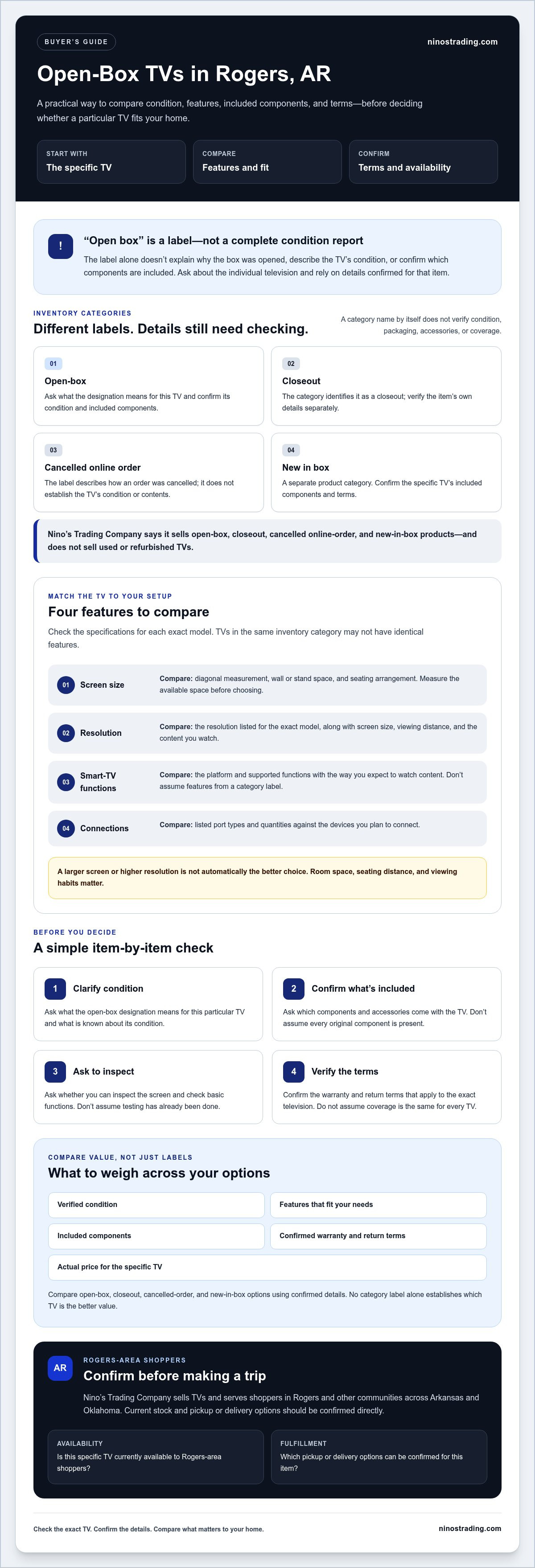
For shoppers comparing open box TVs Rogers AR, treat “open box” as a retailer’s product-condition label, not a universal grade. It can mean the box was opened, but the label alone doesn’t explain why, describe the television’s condition, or confirm which components are included. Ask about the individual TV rather than relying on assumptions about its category.
How open-box TVs differ from other discounted TV categories
Open-box, closeout, cancelled online order, and new-in-box describe different kinds of inventory. A closeout is identified as a closeout, while a cancelled online order describes how an order was cancelled. New in box identifies another product category. None of these descriptions, by itself, confirms a TV’s working condition, packaging, accessories, or coverage. Ask the retailer to clarify those details for the set you’re considering.
The phrase “open box” is also used in other contexts. For example, Wikipedia’s What Does 'Open Box' Mean? page discusses white-box software engineering, a separate technical concept. That isn’t a definition of retail TV condition, so the seller’s explanation is the one to rely on when comparing a television.
Nino’s Trading Company describes its inventory as including open-box, closeout, cancelled online-order, and new-in-box products, and says it doesn’t sell used or refurbished products. Those categories don’t guarantee the condition of an individual TV. Ask what the label means for that particular item and which details have been confirmed.
What a Rogers shopper should confirm first
Before travelling, check whether the specific TV is currently available to Rogers-area shoppers. Nino’s sells TVs and serves customers across Arkansas and Oklahoma, but current stock and fulfillment options need to be confirmed directly.
For the television you’re considering, ask clear, item-specific questions:
- What is its condition, and what does the open-box designation mean for this item?
- Which components and accessories are included?
- What warranty and return terms apply to this TV?
- Is it currently available to Rogers-area shoppers, and which fulfillment options can be confirmed?
These checks help distinguish a useful opportunity from an unclear listing. Don’t assume a TV has been tested, includes every original component, or has particular warranty or return terms unless the retailer confirms those details for that exact item.
Which TV Features Should You Compare Before Buying in Rogers?
A television that looks like a good deal still needs to fit your room and the devices you plan to use. When comparing open box TVs Rogers AR, check the specifications for each individual set instead of assuming TVs in the same category have identical features. Use this checklist to focus your comparison:
| Feature | What to compare | Why it matters |
|---|---|---|
| Screen size | Diagonal measurement and available wall or stand space | Helps the TV fit your room and seating arrangement |
| Resolution | The resolution listed for that exact model | Describes the amount of picture detail the TV can display |
| Smart-TV functions | Platform, supported features, and the functions you expect to use | Helps you decide whether the TV meets your viewing needs |
| Connections | Port types and quantities shown in the product details | Determines whether your devices can connect directly |
Match screen size and resolution to your room
Start by measuring the space where the TV will go, whether that’s a wall or a stand. Then consider the distance from your main seating area and how you usually watch. A larger screen may suit a more distant seating position, but it could overwhelm a smaller room or fail to fit the available space. There isn’t one screen size that works for every Rogers home.
Resolution describes how much detail the screen can show. Compare the resolution listed for each TV, then weigh it against the screen size, viewing distance, and content you watch. A larger screen or higher resolution isn’t automatically the better choice for your setup. If you’re unsure about sizing, consult a trusted guide to choosing the right TV size for your living room.
Check smart-TV functions and connections
Smart features vary by model. Check the product details for the specific platform and supported functions, then consider whether they match the way you watch content. Don’t rely on a general category label to confirm what’s built in.
Check the listed connection types and port count against the devices you already own, such as a game console, streaming device, or sound system. If the details aren’t available, ask the retailer to verify them for that TV. Comparing actual specifications can help you narrow your options. You can also review Nino’s TV offerings as you prepare questions about a particular set.
How to Inspect an Open-Box TV Before You Buy
Inspect the specific television you’re considering, not just its product label. Before visiting, ask whether that TV is available to Rogers-area shoppers and whether you can examine the screen or check basic functions before purchase. Testing may not be possible in every situation, so confirm first rather than assuming.
If inspection is permitted, follow a simple sequence:
- Look over the screen. Check for visible cracks, marks, or other damage. Ask staff about anything you can’t identify clearly.
- Inspect the exterior. Look at the frame, corners, and visible connections for marks or damage. Point out any concerns before deciding.
- Ask about operation. If the retailer allows it, check whether the TV powers on, displays an image, and responds to its controls. Ask whether other essential functions can be checked.
- Compare the details. Match the condition and features you’ve been told about with the information for that exact television.
For shoppers comparing open box TVs Rogers AR, knowing what you can inspect is part of making an informed decision. If a concern remains, ask the retailer to explain it before you commit.
Confirm what comes with the television
Don’t assume an open-box TV includes every component you expect. Ask which accessories come with that item, such as its remote, stand, or cables. If the manufacturer’s listed requirements are available, compare them with what the retailer confirms is included. This helps you identify a missing component you may need for your planned setup.
Before purchasing, get clear answers about the TV’s own warranty and return terms. Don’t assume warranty information for appliances applies to a television. Ask what coverage, if any, applies to the exact set, and have the retailer explain the relevant terms. Confirm the final price as well, including any difference from the listed price.
Before you decide, repeat the key details back: the television’s condition, what comes with it, whether it can be inspected, its price, and its warranty and return terms. If any answer is unclear, pause and ask for clarification. That keeps your decision grounded in details confirmed for the specific TV rather than assumptions about what “open box” means.
Is an Open-Box TV a Better Value Than a Discount or New-in-Box TV?
No category is automatically the best buy. An open-box TV, a closeout, a cancelled online order, and a new-in-box television are different inventory descriptions, but none tells you the full value on its own. Compare the specific set’s confirmed condition, features, included components, terms, and actual price before choosing. A lower price may not be worthwhile if the TV lacks a feature you need or the terms don’t suit you.
Compare condition and terms, not just the label
Use the category label as a starting point, then ask what it means for the exact TV. Don’t assume why it was categorized that way, what condition it’s in, or what comes with it. Get clear answers about its visible condition and included components. Compare warranty and return terms only after the retailer confirms what applies to that television. A category name alone doesn’t establish coverage, return options, or savings.
Nino’s describes its inventory as including open-box, closeout, cancelled online-order, and new-in-box products, and says it doesn’t sell used or refurbished items. Item details can still vary. Don’t apply appliance pricing or warranty information to TVs without TV-specific confirmation.
Decide whether the available TV fits your needs
Compare each option with the way you’ll use it. A TV that fits your room, offers features you’ll use, and connects to your devices may suit you better than a set with specifications you don’t need. Consider a new-in-box alternative too, but verify its features, included components, condition, and terms rather than assuming the category settles the comparison.
Use this checklist as you compare current Rogers-area options:
- Does the screen size work for your room and seating arrangement?
- Are the listed resolution and smart-TV features right for how you watch?
- Can your devices connect using the TV’s verified ports?
- What condition and included components has the retailer confirmed?
- What warranty or return terms apply, and what is the actual price?
For broader comparison advice, see Appliance Sales: How to Compare Options and Find the Right Fit. The same practical habit applies here: compare the details, not just the label. If you’re weighing open box TVs Rogers AR, ask Nino’s about current TV options and item details before deciding.
Open-Box TVs in Rogers, AR: What to Ask Nino's
Nino’s Trading Company sells TVs and serves customers across Arkansas and Oklahoma, including shoppers in the Rogers area. That doesn’t confirm that a particular open-box television is currently available nearby or that a specific pickup or delivery option is offered. Check the details directly before travelling, so you don’t plan around a TV that’s unavailable or doesn’t suit your setup.
Questions to ask about a specific open-box TV
Ask about the television you’re considering, not only the retailer’s general inventory. The answers should help you compare its condition, features, included components, and terms with your needs. If a detail can’t be confirmed, treat it as unknown rather than assuming it’s included or covered.
- What is the exact model, and which features and connections are verified for it?
- What is the television’s condition, and what does its open-box category mean for this item?
- Which accessories or components are included, such as a remote, stand, or cables?
- What warranty and return terms apply specifically to this TV?
- Is it currently available to Rogers-area customers, and which pickup or other fulfillment options can be confirmed?
Plan a practical Rogers-area shopping visit
Confirm current availability and any arrangements directly with Nino’s before setting out. Don’t assume a local storefront, pickup, or delivery option based on the fact that the company serves Rogers-area shoppers. If you’re comparing more than one television, ask for the same details about each model so you can make a fair side-by-side comparison.
Bring your room measurements and a short list of what you need the TV to do. Note the space available on your stand or wall and the devices you expect to connect. Then compare those needs with the model’s confirmed screen size, features, connections, and included components. Before deciding, make sure you understand the item’s condition and TV-specific terms, too.
A little preparation makes the conversation more useful and keeps your decision grounded in details the retailer has verified. If you’re looking into open box TVs Rogers AR, you can contact Nino's Trading Company about current TV options and check availability before making a trip. There’s no need to settle on a TV until its condition, features, and terms make sense for you.
Make Your Next TV Choice With Confidence
A good open-box purchase starts with the details, not the label. Compare each television’s verified condition, screen size, features, connections, included components, and TV-specific warranty or return terms. Then weigh those details against the actual price and a new-in-box alternative to decide what best fits your room and viewing needs.
Nino’s Trading Company sells televisions across Arkansas and Oklahoma, with inventory categories that include open-box, closeout, cancelled online-order, and new-in-box items. Stock and item details can change, so Rogers-area shoppers should confirm what’s currently available and ask about the specific TV before travelling. For open box TVs Rogers AR, checking those details can make the comparison clearer and help you choose with confidence.
Contact Nino's Trading Company to ask about current TV options. Ask about the specific set’s condition, features, and terms before deciding which option makes sense for your home.
Frequently Asked Questions
Are open-box TVs used or refurbished?
Not necessarily. “Open box” is a retailer’s product-condition category, and its meaning can vary by item and seller. Nino’s Trading Company says it doesn’t sell used or refurbished products, but the label alone doesn’t confirm the condition of a specific TV. Ask what the category means for the television you’re considering and have the retailer clarify its condition before deciding.
Can I find open-box TVs in Rogers, AR?
Possibly, but current availability needs to be confirmed. Nino’s sells TVs and serves shoppers in Rogers, Little Rock, Fort Smith, Fayetteville, Springdale, and Bentonville in Arkansas, as well as Tulsa and Oklahoma City in Oklahoma. That doesn’t confirm a particular open-box TV is currently available or where it can be collected. Check directly with the retailer about the specific item and any available fulfillment options before travelling.
What should I check before buying an open-box TV?
Check the exact TV’s condition, model, features, connections, included components, price, and TV-specific warranty and return terms. If the retailer permits inspection, look for visible screen or exterior damage and ask whether basic functions can be checked. Compare the confirmed specifications with your room and devices. For open box TVs Rogers AR, verify current availability before making a trip instead of relying on a general category label.
Do open-box TVs include a warranty?
Warranty coverage depends on the specific television and the terms confirmed by the retailer. Don’t assume an appliance warranty applies to a TV or that every open-box set has the same coverage. Ask what warranty, if any, applies to the exact model, what it covers, and how long it lasts. Confirm the return terms separately, and make sure you understand both before purchasing.
Are open-box TVs cheaper than new-in-box TVs?
Not always. Compare the actual price of each option alongside its verified condition, features, included components, and warranty or return terms. A new-in-box TV may better suit your needs, while an open-box option may be worth considering if its details and price make sense to you. Don’t assume a particular discount based on the label. Ask the retailer to confirm the current price for each television.
What accessories should come with an open-box TV?
There isn’t a confirmed accessory list that applies to every open-box TV. Ask which components are included with the exact set, such as its remote, stand, or cables, and compare that answer with the manufacturer’s information when available. Don’t assume an item is included because it usually comes with a new TV. Confirm what you’ll receive before deciding, especially if a component is needed for your setup.
Can I check whether an open-box TV works before buying it?
Ask the retailer whether inspection or testing is allowed for the specific television. If permitted, see whether it can be powered on and display an image, and ask whether essential functions can be checked. Don’t assume testing is available. If you can’t check it before purchase, ask the retailer to explain the TV’s condition and applicable terms clearly so you can make an informed choice.


