
The lowest-priced TV isn’t always the best deal. A discount can mean a new-in-box set, an open-box item, a closeout, or a cancelled online order, and each label points to different details to check before buying. If you’re comparing discount TVs Fayetteville AR shoppers can find options at local retailers, larger stores, and online marketplaces.
Price matters, but so do the TV’s condition, included accessories, and the seller’s return and warranty terms. Nino’s Trading Company sells TVs in cancelled online order, open-box, closeout, and new-in-box categories, not used or refurbished sets. Availability and TV-specific terms can vary, so confirm the details for the item you’re considering.
This guide explains how to compare buying options and choose a TV that suits your room, budget, and intended use. Use the checklists to examine the screen and accessories, ask about purchase policies, and confirm current inventory before making the trip.
Key Takeaways
- Compare local retailers, larger stores, and peer-to-peer listings for discount TVs Fayetteville AR, and confirm current availability before traveling.
- Understand what new-in-box, open-box, closeout, and cancelled-order labels describe. The label alone doesn’t confirm a TV’s condition or included items.
- Compare the exact TV’s specifications, screen size, accessories, and seller terms instead of judging a deal by its category or price alone.
- Inspect the set for visible damage, check its ports and accessories, and ask about return and warranty terms.
- Consider Nino’s Trading Company as one local option, with TVs listed in cancelled online order, open-box, closeout, and new-in-box categories. Confirm the specific item’s condition and availability before visiting.
Where to Find Discount TVs in Fayetteville, AR
When shopping locally, compare more than the advertised price or a condition label. Retailers, larger stores, and peer-to-peer marketplaces can all be options, but their listings may differ in how they describe condition, show the item, and explain returns or warranty coverage.
A discount TV is a television offered at a reduced price with a stated sale condition. The discount label alone doesn’t confirm its quality or what comes in the box. Ask what the label means for the specific set. For instance, a refurbished electronic device may have been tested or repaired, as explained in this overview of refurbished electronics. Nino’s Trading Company says it sells cancelled online orders, open-box, closeout, and new-in-box TVs, not used or refurbished sets.
Which Fayetteville-area TV shopping options should you compare?
Compare a local retailer such as Nino’s with larger stores and marketplace listings. Best Buy’s Fayetteville store is at 464 E Joyce Blvd, and Walmart has Fayetteville Supercenters on W Martin Luther King Jr Blvd and Mall Ave. These are shopping options, not confirmation that a particular discounted TV is in stock. Ask each seller about the condition and the return and warranty terms for the specific set.
Peer-to-peer listings may require extra care because the seller could be an individual rather than a retailer. Ask to see the exact TV, find out whether you can inspect it before purchase, and confirm which accessories are included and what return arrangement, if any, applies. Don’t assume listing photos or a category label tell the whole story.
How can you check local TV availability before leaving home?
Search results can help you find sellers, but they don’t confirm current inventory, condition, or store hours. Before driving from Fayetteville or another Northwest Arkansas community, contact the seller about the exact set you’re considering. A quick check can help you avoid a wasted trip.
- Confirm the exact model and its current condition, rather than asking only whether discounted TVs are available.
- Ask whether you can inspect the television and which accessories, such as the remote and power cord, are included.
- Verify the location, hours, and any pickup arrangements directly with the retailer.
- Ask which return and warranty terms apply to that TV. Don’t assume appliance policies also cover televisions.
Nino’s is one local option for discount TVs Fayetteville AR shoppers can compare. Confirm location details, hours, and the availability and condition of a specific TV before setting out. Asking the same questions of each seller makes it easier to compare the details that matter, not just the label.
What New-in-Box, Open-Box, Closeout, and Cancelled-Order TVs Mean
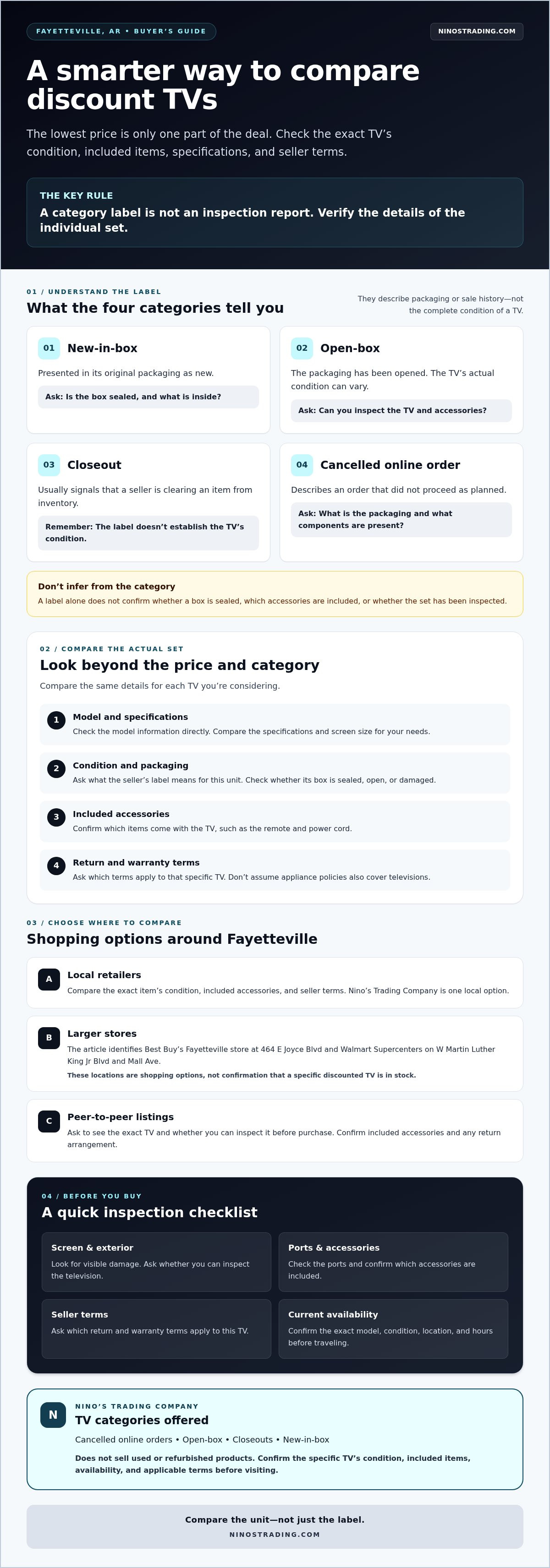
These labels describe aspects of a TV’s packaging or sale history, but they aren’t a complete inspection report. “New-in-box” and “open-box” relate mainly to packaging status, while “closeout” and “cancelled order” describe why an item may be offered for sale. None of these terms alone tells you whether the packaging is sealed, which accessories are included, or whether the set has been inspected.
For any discount TV, confirm the individual unit’s condition and included items instead of relying on its category label. That’s useful when comparing discount TVs Fayetteville AR shoppers find under different descriptions. Nino’s Trading Company sells TVs in cancelled online order, open-box, closeout, and new-in-box categories, and does not sell used or refurbished products.
How does a new-in-box TV differ from an open-box TV?
A new-in-box TV is generally presented in its original packaging as new, but ask whether the box is sealed and what’s inside. An open-box TV has had its packaging opened. Its actual condition can vary, so don’t assume it was damaged, used, or discounted by a particular amount. Ask whether you can inspect the TV and accessories before purchasing, and confirm what the seller means by the label.
What should you ask about closeout and cancelled-order TVs?
A closeout label usually signals that a seller is clearing an item from inventory; it doesn’t tell you the TV’s condition. A cancelled-order label describes an order that did not proceed as planned, but it doesn’t establish whether the box is sealed or what components are present. For either category, ask about the unit’s packaging, visible condition, and included parts. Check the model information directly to compare specifications rather than inferring features from the sale category.
- Is the box sealed, opened, or damaged?
- Can the TV and its included accessories be inspected?
- What return terms apply, and is any warranty available for this TV?
Warranty terms can differ by seller and product. The Federal Trade Commission’s Federal Warranty Law guide offers general background. Ask the seller to explain the written terms for the specific television. Nino’s appliance warranty terms shouldn’t be assumed to apply to TVs. To review one local seller’s stated TV categories, visit Nino’s Trading Company, then confirm the condition and availability of any particular set before making a trip.
How to Compare Discount TVs Without Focusing on the Label
Start with the TV you need, not whether a listing says open-box or closeout. Those labels describe a sale category, while screen size, specifications, included accessories, and seller terms determine how well a particular set fits your home. Use the same checklist for retailer inventory and individual marketplace listings to compare the full purchase.
| Condition | Screen size | Features | Accessories | Seller terms |
|---|---|---|---|---|
| Ask what the seller means by the category and the condition of this exact unit. | Compare the listed size with your room layout and intended viewing spot. | Check the exact model specifications and features you plan to use. | Confirm which items are included and inspect them if possible. | Review the written return and warranty terms for this TV. |
| Look for a clear description or inspect the set before purchase. | Measure the available wall or stand space before choosing. | Check resolution and Smart TV details instead of relying on a broad category name. | Ask about the remote, stand, power cable, and any other stated components. | Ask who handles questions or issues after the sale. |
Which TV specifications matter for your room and viewing habits?
Start with the available space and where people will sit. Measure the wall or stand, then consider the viewing distance and whether the screen will work with the room’s layout. A larger set isn’t automatically a better fit if it crowds the space.
Compare the exact model information. “Smart TV” generally indicates internet-connected features, while resolution describes the level of picture detail the screen can display. These terms don’t identify every feature, so check the specifications for each set. Consider what you watch and which household devices you’ll connect. Check the TV’s HDMI connections against those devices rather than assuming the ports will suit your setup.
How do you compare the complete purchase, not just the screen?
Use a short checklist for every seller. Confirm whether the remote, stand, power cable, and any other stated accessories are included. If you can inspect the TV, compare the item in front of you with its description. For online listings, ask clear questions about the exact unit before arranging a purchase.
Then read the seller’s written warranty and return terms. Two discount TVs Fayetteville AR shoppers are considering aren’t equivalent if one has different included items or unclear terms. Compare the complete package and its fit for your household, not just the sale label or advertised price.
What to Inspect Before Buying a Discount TV in Fayetteville
A few checks can help you identify unanswered questions before you pay, whether you’re in a store or reviewing a marketplace listing. Use this checklist for the specific TV you’re considering, and ask the seller to clarify anything you can’t verify yourself.
- Look over the screen. Check for visible scratches, cracks, marks, or other damage. If you’re viewing a listing, ask for clear photos of the actual TV rather than relying on general product images.
- Inspect the exterior. Look at the casing, corners, and frame for signs of damage. Ask whether the set can be powered on so you can check that the screen displays an image.
- Check the connections. Review the available ports and compare them with the devices you plan to connect, such as a streaming device or game console. Don’t assume a port is present just because another TV model has it.
- Confirm what’s included. Check for the remote, stand, power cable, and any other items the seller says come with the TV. Ask which components, if any, are missing or excluded.
- Clarify the unit’s condition. Ask the seller to describe the exact TV, not just its sale category. Find out whether you can inspect it before buying and whether the seller can demonstrate that it powers on.
- Read the purchase terms. Ask what warranty, if any, applies to this television and request the terms in writing. Confirm the return or exchange policy before completing the purchase.
- Take extra care with marketplace listings. Confirm who you’re meeting, agree on the meeting arrangements, and make sure you’ll have an opportunity to inspect the TV before paying.
Inspecting the TV and getting its purchase terms in writing reduces avoidable uncertainty, but it doesn’t replace checking the exact set yourself. For discount TVs Fayetteville AR shoppers are comparing, don’t assume a seller’s appliance warranty or return terms also apply to a television. Ask which policies cover the specific item and keep a record of the answers.
Check the details before you visit
If the set is at a retailer, contact the seller before leaving to confirm it’s still available and ask whether inspection is possible. For an online listing, get answers about condition, accessories, and pickup arrangements before setting a meeting. Clear details up front make it easier to decide whether a trip or purchase makes sense.
For current TV availability and terms for a specific item, contact Nino’s Trading Company before visiting.
Shopping for Discount TVs at Nino's Trading Company
Nino's Trading Company is one Fayetteville-area option to compare when looking for a TV. Its stated TV categories include cancelled online orders, open-box, closeout, and new-in-box items. These categories describe different sale circumstances, but they don’t confirm that a particular size, feature, or model is currently available. Inventory can change, so check on the exact item before planning a visit.
Before shopping, consider what you need: the screen size that fits your space, the features you’ll use, and the devices you plan to connect. You don’t need a model number to ask a useful question, but sharing one can help identify the set you mean.
What should you ask Nino's about its current TV selection?
Ask whether a TV in your preferred size or with the features you need is currently available, then confirm the exact unit’s condition. Find out which accessories are included and whether you can inspect the TV before buying. Nino's sells liquidation merchandise, so don’t assume a television has a manufacturer’s warranty. Ask what TV-specific warranty and return terms apply, and request the details in writing.
Before setting out, verify the location details and hours directly with the retailer. If you’re arranging pickup, confirm the applicable arrangements as well. These checks help you avoid relying on outdated search results or general information that may not match the TV you’re considering.
How can you compare Nino's with other local TV sellers?
Use the same comparison questions with each seller, whether you’re looking at a retailer’s stock or an individual listing. Check the condition, exact specifications, accessories, and written warranty and return terms. A category label or product listing alone can’t confirm that a set suits your home or that its components and terms match another offer.
- Is the specific TV available now, and what is its condition?
- Can you inspect it, and which accessories are included?
- What warranty and return terms apply to this television?
- Where is the seller located, and what hours or pickup details should you confirm?
Comparing discount TVs Fayetteville AR shoppers find is easier when every option is checked against the same needs and questions. Nino's does not sell used or refurbished products, but confirm the condition of the individual TV and its terms. For current availability, check with Nino's about its TV selection before visiting.
Choose Your Next TV With Confidence
A good discounted TV is one that fits your room and viewing needs, with condition, included accessories, and seller terms you understand. Compare the exact set rather than relying on labels such as open-box or closeout, and confirm availability before making a trip. These checks help you assess discount TVs Fayetteville AR shoppers find based on more than the advertised deal.
Nino’s Trading Company sells TVs and serves communities in Arkansas and Oklahoma, including Fayetteville, Springdale, Rogers, Bentonville, Little Rock, Fort Smith, Tulsa, and Oklahoma City. Its inventory categories include cancelled online orders, open-box, closeout, and new-in-box items. Confirm a specific model’s availability and TV warranty or return terms directly.
Use the checklist to compare your options and choose a TV that fits your home.
Frequently Asked Questions
Where can I find discount TVs near Fayetteville, AR?
Compare local retailers, larger stores, and marketplace listings, then confirm the exact TV and its terms before traveling. Nino’s Trading Company is one option serving Fayetteville and other Arkansas and Oklahoma communities, including Springdale, Rogers, Bentonville, Little Rock, and Fort Smith, as well as Tulsa and Oklahoma City. Its TV categories include open-box, closeout, cancelled online orders, and new-in-box items. Current stock can change, so check availability directly.
Are open-box TVs used or refurbished?
Not necessarily. “Open-box” means the packaging has been opened, but the label alone doesn’t establish whether the TV was powered on, what condition it’s in, or what accessories are included. Ask about the specific set and whether you can inspect it before buying. Nino’s states that it does not sell used or refurbished products, but confirm each unit’s condition, included items, and applicable terms.
What should I check before buying a discounted TV?
Inspect the screen and casing for visible damage, and ask whether the TV can be powered on. Check that its ports suit the devices you plan to connect, then confirm whether the remote, stand, power cable, and other listed accessories are included. Ask the seller to explain the unit’s condition and provide its TV-specific warranty and return terms in writing. For a listing, request details about the exact set.
Can I check whether a Fayetteville store has a TV in stock?
Yes. Contact the seller before leaving and ask about the exact model, or the screen size and features you want. Confirm its current condition, included accessories, and whether inspection is possible. Search results and category pages may not reflect live stock, store hours, or pickup arrangements, so verify those details directly with the retailer. This is a practical first step when comparing discount TVs Fayetteville AR shoppers find at different sellers.
Is a closeout TV a good deal?
It can be a good fit, but “closeout” alone doesn’t tell you the TV’s condition, specifications, accessories, or seller policies. Compare the exact model with your room and viewing needs, inspect the set if possible, and check the written warranty and return terms. A closeout label explains a sale category, not whether the TV is the right choice. Consider the whole purchase before deciding, not the label by itself.
Does Nino's Trading Company sell refurbished TVs?
No. Nino’s Trading Company states that it doesn’t sell used or refurbished products. Its TV categories include cancelled online orders, open-box, closeout, and new-in-box items. Since each unit’s availability and condition can vary, ask about the particular TV you’re considering, what comes with it, and which warranty and return terms apply. Confirm current stock and relevant location details before visiting so you can plan your trip with clearer information.
For a clear next step, ask Nino’s Trading Company about current TV availability and the terms for the specific set before visiting.


